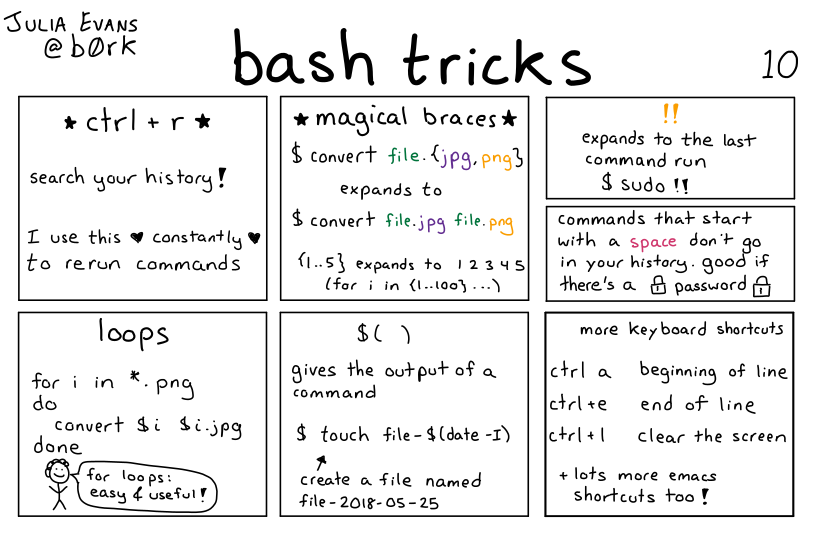
alias fuck="sudo !!"
Talk about the Bash Shell and Bash scripting
alias fuck="sudo !!"
i’m also a fan of
alias please="sudo !!"
lol I've had this exact line in my profile for years ❤
Heh, I like the alias! But what does it do, actually? Cuz "expands the last command" doesn't exactly mean "stop the last command".
cd - goes back to the last directory you have been in
pushd and popd are also pretty neat in that they allow you to change directories using a stack; particularly useful as part of that is that using pushd without any arguments will pop the directory on top of the stack and move you there, while putting your previous directory on top of the stack. When you're working across directories where you need to move around within each directory, it can be really handy.
Nice!
Also cd without any parameters takes you to your home directory.
'cd ..' goes up a level
2 dots goes up a level, 3 dots is a syntax error:
bash: cd: ...: No such file or directory
.. does exactly the same. Just two dots, no need of cd.
I thought that was only a Garuda Linux thing.
Bottom left example will leave you with a lot pictures ending on ".png.jpg".
What's a better way?
convert $i ${i%.*}.jpg
NB: I'm no guru - I just googled "remove file extension in bash".
Should also definitely be quoting both arguments
Julia Evans’ (@b0rk@jvns.ca on mastodon) website[0] is loaded with similar info-comics and exploration of development and networking tools, among other things.
Remember for $() to wrap it in quotes to prevent word splitting!!!
The most useful bash trick for me is to save what I learn in demonstration scripts so I can $cat it later for a syntax reminder.
ex :
file named : ./follow_jellyfin_system_log
contents :
#!/bin/bash
journalclt -fe -u jellyfin
(some time later) .. wtf args do i pass to journalctl again..
$ls ./script_parent_directory
(list of actions written in human language appear as file names)
$cat ./follow_jellyfin_system_log
me : "oh duh!"
rinse and repeat for every command or shortcut you learn, it forces you to convert the command into a short "noun_verb" format which to me is infinitely more understandable.
that's my workflow. then the meta is deciding how to store your scripts so you don't end up with a polluted home dir. godspeed fellow bashers.
For shorter, often used workflows i end up making an alias in bashrc/zshrc.
Tbh, I should consider migrating some of my one-liners to bash aliases. I just like to be cautious to not pollute my shell's auto-complete.
You can always start them off with an underscore ;)
lots more emacs shortcuts
You're referring to libreadline, which supports both vi and emacs
https://en.wikipedia.org/wiki/GNU_Readline
Ctrl + _ is a pretty overlooked command
The most useful bash command of all: sudo apt-get -y install zsh; chsh -s zsh; exec zsh ;)
I kid, I kid! I actually like bash a lot. I really prefer it for scripting. Arrays are extremely useful but not specified in posix. Bash is pretty ubiquitous though.
I'm also curious if there are any bash partisans who prefer it over zsh and for what reasons.
I actually prefer fish, but I want to learn more bash because is is ubiquitous and a lot of bash stuff also works in fish.
You may also like NuShell. It's been designed from the ground up to be an intuitive and convenient shell language.
Wait, the other shells were designed to be obtuse and inconvenient? /s
Haha whoops, didn't want to imply that. I meant to say that it's intuitive for me, who finds bash syntax cryptic.
Can you tell me how to run a command and ignore an alias in NuShell? I don't really use nu but when i tried to write something in it, this was something that eluded me
Oh, if you want to avoid running a built in command like ls or cp and want to run the actual thing in /usr/bin, you prefix it with a ^, so eg ^cp -p.
Interesting. What does the ^ do in this situation?
And I just want to not respect an alias, so falls back to either builtin or path.
In zsh or bash I can prefix the command with the word command, or a backslash (directly before the command)
https://www.nushell.sh/book/escaping.html
I don't know whether unsetting an alias is possible though.
https://www.nushell.sh/book/aliases.html#replacing-existing-commands-using-aliases
Fish is great! I used it for a while a long time ago but I ended up stopping because a few tools expected your shell to be set to something posix compatible. I wonder if the support is better now, I should give it a shot
I'm a serious bash scripter, I mean I do it both at work and as a hobby. And zsh arrays are better. Like you can use negative indecees and stuff. I have only written shell functions in zsh (my primary shell), and not thousands of lines of scripts like I have for bash. But if zsh had as good documentation and language servers I'd probably do many scripts in zsh instead. But I can't say for certain, as I am not as sure about performance in some situations and stuff.
Why don't I use posix shell if I care about performance? Because they are only faster in very simple scripts,
Another cool bash trick: $! gets all the arguments of the previous command, but not the command itself
another useful one is <(cmd here)
It's like $(cmd here) but instead of returning the output of the command as a string passed into the arguments, it makes a new file descriptor for the output of the command and returns the path to it, for use in commands that want a file as an argument.
So for example if you want to use diff to compare your local passwd file to a remote one..
diff -u <(ssh host1 cat /etc/passwd) /etc/passwd
Admittedly I can't think of many things I've used this for outside of diff and alternatives to diff..but I've used it there a lot, like comparing the results of running two slightly different queries.
I use this one for comm a lot. E.g.,
comm -12 <(sort some_file) <(grep foo some_other_file | sort)
I am not sure what the default keybinding is for this but I always create a .inputrc file for searching forward and backward in the history without opening the C-r menu:
"C-p": history-search-backward
"C-n": history-search-forward
Oh my god, I didn't realize this was an NSFW community. This graphic changed my life
I've disabled bash history. Or rather, I made that file immutable. I did that bc I never needed the file and on top of that something (IDK what) was constantly filling it with repeated commands that I have used until the file becomes a few hundred megabytes. And since I use aliases (currently ~280 aliases with ~200 bash scripts), I don't need bash history, so I disabled the file. If I need a repeat of a command, I simply repeat the alias.
The magical braces sounds interesting and I might start using it. Not sure if it will work in a for loop with several commands inside the loop, but it's worth to try, even if just to see what will happen. :)
Here's another trick you obviously don't know: the for loop is much more readable and understandable (by anyone reading it after you) if you replace the "i" with an actual word, depending on the context, like this:
for name in *.flac; do newname=$(echo "$name" | rev | cut -f 2- -d '.' | rev) ffmpeg -i "$name" -vn -ar 44100 -ac 2 -ab 1411k -f wav "$newname".wav; done
This way, any other person who reads your code will be able to better understand the loop, or if they're like me - will understand in principle what the loop does. Back when I was trying to learn programming, the so called programmers (teachers) were unable to explain where the hell that i comes from and so I was unable to understand how the loop works. I can't use a function which I don't understand how it works and/or what it does. It might sound stupid but that's how my brain works. But once I decided to experiment on my own and instead of "i" I wrote "name" like shown above. And suddenly the for loop became crystal clear about what it does and how it works. An AI helped for the "newname=" contents in the brackets, the rest was me.
The "touch" file looks more useful for a loop where multiple files with different timestamps must be created. For a single use this is a lot harder to remember than
command > /path/to/filename.txt
Finally, I'd appreciate a shortcut to stop the execution of a command because sometimes Ctrl+C works, but sometimes it doesn't and instead Ctrl+Z works in its place. If there's a univeral shortcut to cancel the execution of any command, that would be way more useful, IMO.
If I need a repeat of a command, I simply repeat the alias.
This only makes sense if you make an alias for every command you ever use...which sounds like a lot of pointless labor. I don't use bash history anymore, though, because I use fish, and it can autofill your commands without having to do a search through history. Much easier.
Here’s another trick you obviously don’t know
You presume too much. I didn't create this comic. I've heard the debate around pros and cons of metasyntactic variables, and I think there are good points on both sides. Typically, when I want to use an example, I try to use a specific case, because it makes it more memorable, but I've actually had somebody get more confused by that, so I guess you can't make everybody happy.
My question is: Are you confused by algebra? Like, when you see "2 + X = 5", do you say "I can't solve this! WTF is X??? What does it mean?"
The “touch” file looks more useful for a loop where multiple files with different timestamps must be created. For a single use this is a lot harder to remember than command > /path/to/filename.txt
I'm not sure what you're saying here. Do you know what touch does? Also, no, it isn't easier to look up the timestamp and manually type it in, even if it's just one file. This was really about using $(), not touch, anyway.
Finally, I’d appreciate a shortcut to stop the execution of a command because sometimes Ctrl+C works, but sometimes it doesn’t and instead Ctrl+Z works in its place. If there’s a univeral shortcut to cancel the execution of any command, that would be way more useful, IMO.
This is one of the quirks of Unix and Unix-like systems. I was reading something about this recently. I think that it has to do with how programs are written and how they interact with the shell. CTRL-C is used by the shell, but some programs use CTRL-Z instead. So, I think that some programs override the shell or something like that?