this post was submitted on 18 Jun 2026
5 points (61.9% liked)
linux4noobs
4227 readers
9 users here now
linux4noobs
Noob Friendly, Expert Enabling
Whether you're a seasoned pro or the noobiest of noobs, you've found the right place for Linux support and information. With a dedication to supporting free and open source software, this community aims to ensure Linux fits your needs and works for you. From troubleshooting to tutorials, practical tips, news and more, all aspects of Linux are warmly welcomed. Join a community of like-minded enthusiasts and professionals driving Linux's ongoing evolution.
Seeking Support?
- Mention your Linux distro and relevant system details.
- Describe what you've tried so far.
- Share your solution even if you found it yourself.
- Do not delete your post. This allows other people to see possible solutions if they have a similar problem.
- Properly format any scripts, code, logs, or error messages.
- Be mindful to omit any sensitive information such as usernames, passwords, IP addresses, etc.
Community Rules
- Keep discussions respectful and amiable. This community is a space where individuals may freely inquire, exchange thoughts, express viewpoints, and extend help without encountering belittlement. We were all a noob at one point. Differing opinions and ideas is a normal part of discourse, but it must remain civil. Offenders will be warned and/or removed.
- Posts must be Linux oriented
- Spam or affiliate links will not be tolerated.
founded 2 years ago
MODERATORS
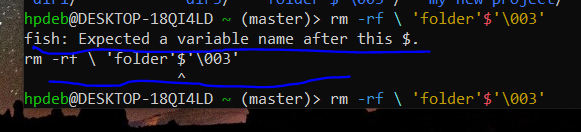
Yep as others have noted put a \ in front of each special character. The \ tells the system to treat the following character as a alphanumeric character in the string and not as a operator or a command. Since ', $ and \ are all special characters you will need a \ just before each when typing this name. Also as mentioned do this with a benign command like ls first to make sure your only acting on that specific directory or you might have a bad day.
Edit: How the heck did you get some of those folder names? Looks like a script with incorrect variable/macro substitution made these.