Hi everyone,
I’m not sure if this is the right community, but the home networking magazines seem to be pretty dead. I’m a bit green with regard to networking, and am looking for help to see if the plan I’ve come up with will work.
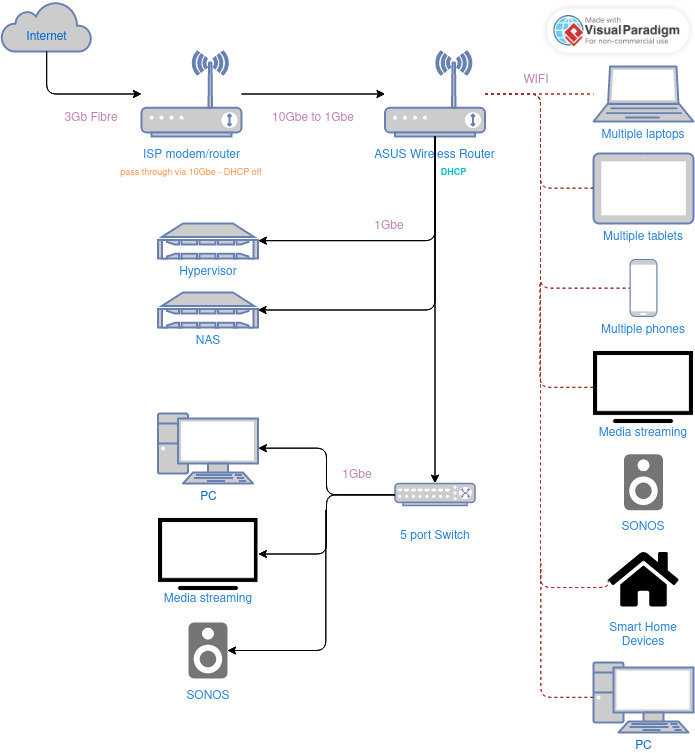
The main image in the post is my current network setup. Basically the ISP modem/router is just a pass through and the 10 Gb port is connected to my Asus router, which has the DHCP server activated. All of my devices, home lab and smart home devices are connected to the Asus router via either Wifi or Ethernet. This works well, but I have many neighbours close by, and with my 30+ wifi devices, I think things aren’t working as well as they could be. I guess you could say one of my main motivations to start messing with this is to clean it up and move all possible devices to Ethernet.
The planned new setup is as follows, but I’m not sure if it’s even possible to function this way.
https://i.postimg.cc/7YftSFt6/IMG-9281.jpg
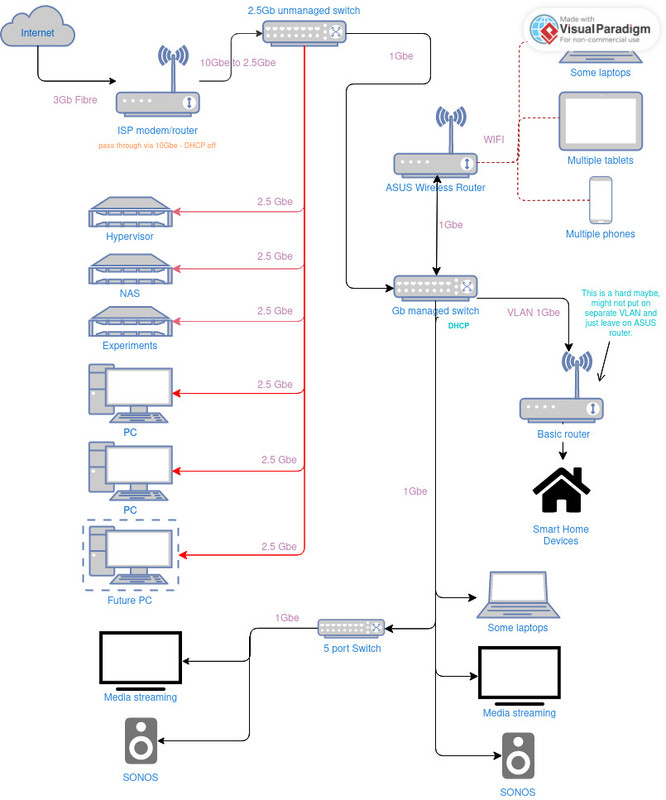
ISP modem/router > 2.5 Gb unmanaged switch > 2.5 Gb capable devices (NAS, hypervisor, PCs) will connect directly here, along with a 1 Gb managed switch to handle the DHCP > Asus router would connect to the managed switch to provide wifi, and remaining wired devices will all connect to the managed switch as well.
Any assistance would be appreciated! Thanks!
Edit: fixed second image url
VLANs are a standard: 802.1Q. Your client devices don't have to support it, just your switches, routers, and access points. On a switch, you can configure each port to treat untagged data as part of a particular VLAN. Similarly, with a good wi-fi access point, you can add multiple SSIDs each of which is on a different VLAN.
You’re right. I just gave a very simplified answer. VLAN isn’t part of the default network communication and therefore every „node“ needs to support it and be correctly set up, or otherwise the VLAN tag will be removed at that point.
And in my other comment I emphasized, that my main issue with multiple WAP is, to distribute the amount of devices each has to talk to. Multi SSID wouldn’t solve that