Creative

5120 readers
1 users here now

Beehaw's section for your art and original content, other miscellaneous creative works you've found, and discussion of the creative arts and how they happen generally. Covers everything from digital to physical; photography to painting; abstract to photorealistic; and everything in between.

(It's not mandatory, but we also encourage providing a description of your image(s) for accessibility purposes! See here for a more detailed explanation and advice on how best to do this.)


Subcommunities on Beehaw:


This community's icon was made by Aaron Schneider, under the CC-BY-NC-SA 4.0 license.

founded 4 years ago
MODERATORS
1


cross-posted from: https://lemmy.zip/post/58932519

Hey everyone, with the new Discord changes, I decided it was a great excuse for me to finally try to ditch discord. I mostly used discord for my creative endeavors through the years (collaborating on projects, help with software - looking at you Blender and Godot, and etc) but now I really only have my small community that I was trying to start back up based on my board game project.

As someone who drifts from project to project, and often tries to find other people who want to participate in projects - this forum is meant to fill two needs:

  1. A communication and contributor hub for the various open source and creative commons projects I am currently working on, as well as a centralized location to access information and assets for said projects.
  2. A place for other creative individuals to network, collaborate, and share their own projects - or even simply chat and meet like minded individuals.

I am a huge advocate for the creative commons, open source software, and the overall Libre community that counters the capitalist models that are so prevalent in the online space. While members of this community don't need to share these same ideals, I would like to foster a community that can lift up and encourage others who contribute to this space. It would be nice if we could create a community where people help and contribute to each others creative endeavors and improve the FOSS/CC community.

And honestly, I kind of miss the days when forums were the primary form of communication, before discord - so I am excited to see if this community can take off at all.


The community is non existent at the moment, but if any of you would be willing to check it out and stick around for a while to see if we can grow - I would be greatly appreciative. If anyone has feedback for improvement or ideas for direction of the forum, I would love to hear any and all constructive criticism.

2


This took me forever, but I'm proud of how it turned out. I didn't get many early progress pictures, so all I have are some from the last couple of weeks. The whole thing is hand stitched, including the whipped edge.

Nearly finished piece without the outlining

Outlined

Off the hoop, washed, cut, and whip-stitched

I think I'd like to try some more variety on the types of stitches I use to fill areas next time. I pretty much only used basic back stitches and satin stitch for this. I tried a tight seed stitch initially for the dog's fur, but didn't like it and spent a whole evening picking it out.

I also found the process of washing the piece (this isn't strictly necessary but I had used water soluble pen to trace the image and needed to wash it to get the ink out) and cutting it very nerve-wracking. It took so damn long to sew and I was terrified I was going to fuck it up right at the end. There were a couple of spots where I felt like I didn't cut it quite as evenly as I wanted, but after adding the stitched edge you can't really tell at all. I also had no idea what I was doing when fusing the initial piece to the felt backing with interfacing, and the interfacing didn't fully adhere to the fabric in a few places, but it worked out fine.

All in all it took forever and there are a few noticeable mistakes, but overall I'm pretty proud of it and I'm hoping the next one doesn't take so long.

3
14
I released a Single! (fasterfeather.bandcamp.com)


This is my first actual real attempt at music, and so I picked Mathcore as a style and spent the last year working on a few songs, but polished this one the most. I spent the last year re-recording it and re-writing, practicing, and I even learned how to fry scream. Last night, I felt good about it so I released it with a goal to finish an album and release it song by song until April 2026!

Would love your feedback if you have any, and I hope this is okay to share. I love beehaw but I don't post too much.

4


I've been debating doing this sort of video for a while, as they take a lot of time to make and write for, and I've never been much of a writer. I decided to give it a go in any case. I would love any feedback you could give.

5
6
 
 
7
 
 
8
 
 
9


Courtesy to Twitter user XdanielArt (date of publication: 8 June 2024)

10


I'm an aspiring screenwriter and need some constructive criticism. Please go easy on me, I've poured my heart into these.

Only five unique ideas so far, could stay that way for a long while or maybe not. Inspiration comes when it comes.

11


Archived

A provocative projection on Tesla’s Berlin Gigafactory depicted Elon Musk performing a Nazi-style salute, accompanied by the text “HEIL TESLA” in Tesla’s iconic font. This striking act was orchestrated by the British activist art collective Led By Donkeys, known for their sharp political art and 'Zentrum für Politische Schönheit' ['Center for Political Beauty'].

The projection targeted Musk’s controversial gesture during Donald Trump’s inauguration, which has been widely criticized for evoking fascist imagery. By placing this statement in Germany—a country with strict anti-Nazi laws and a profound historical context—Led By Donkeys amplified the gravity of their message, challenging the unchecked influence of billionaires and the normalization of extremist symbols.

[...]

12
13
14


Calligraphy and fountain pens

15


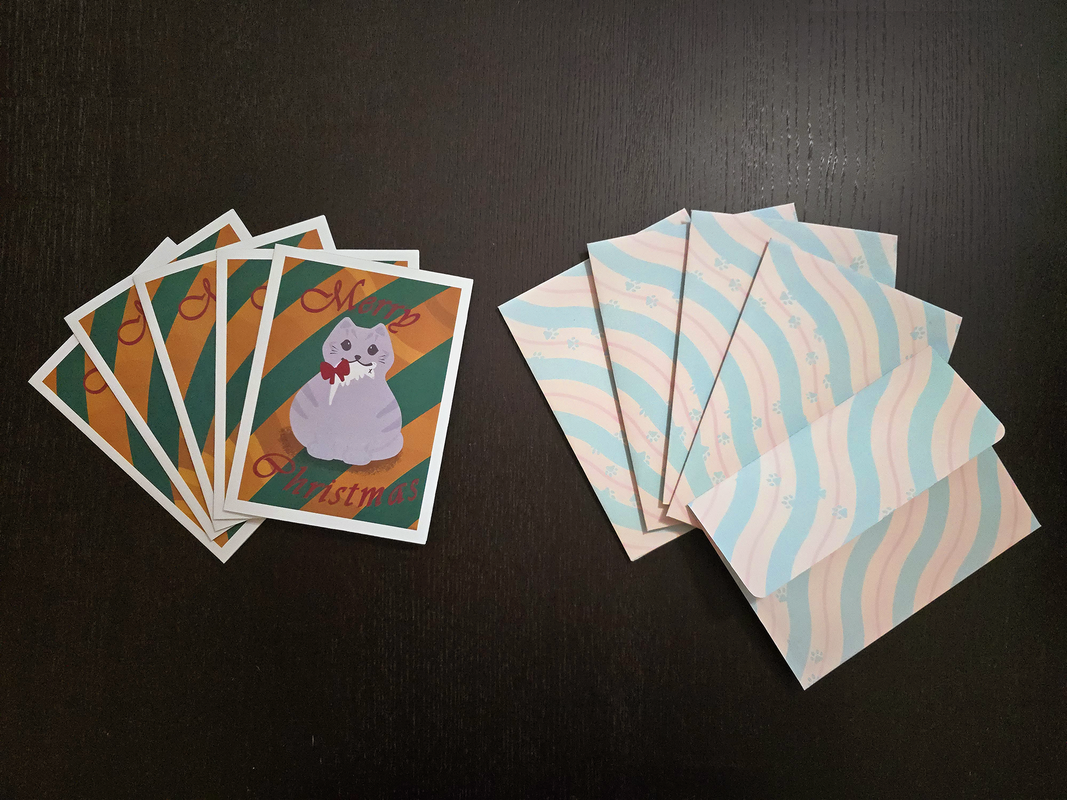
Image Transcription

A small stack of Christmas cards, a small stack of envelopes with the back facing the camera, and a single envelope with the flap facing the camera.

The cards have a round grey cat holding a dead mouse with a red bow on the mouse in the cat's mouth. The cat is standing in front of a gold and dark green striped background. The words "Merry Christmas" are printed on the card in maroon cursive. There is a white border around the edge of the card.

The envelopes have parallel squiggly stripes diagonally covering the envelopes. The stripes are a repeating pattern of thick light green, medium thickness light yellow, thin light red, and medium thickness light yellow again. There is a path of paw-prints walking across the envelope in the same light green as the diagonal stripes.

The envelope with the flap facing the camera is printed with the same pattern and reveals the flap to be a flat-edge flap with rounded corners

I have wanted to send out Christmas cards to my friends for some time, but was never able to get a festive photo to use for such purpose; so this year instead of trying to convince my partner to take the appropriate pictures, I decided to illustrate the card instead.

As for the envelopes, I realized I did not have access to any A6 envelopes and it looked like it would take a long time for them to ship to me. Originally I was going to cut the envelopes out of standard construction paper, but I realized if I made flat-flap envelopes instead of triangular-flap envelopes, I would be able to cut the card out of a single 8.5"x11" sized sheet. With this in mind, I decided to design the envelope myself as well since I could print across the entire envelope area.

The pattern for the card was illustrated in Procreate (but the text was added via Illustrator). The envelope pattern was designed entirely in Illustrator (including the cutting template). The cards and envelopes were printed on card-stock and cut out using my vinyl cutter.
16


Waterproof fountain pen ink, Noodler's Rachmaninoff, and Czech Kohinoor watercolours

17


I just bought my first sewing machine! I'm an absolute beginner, the most sewing I've done is hand-repairing holes in clothes. Do you all have any recommendations for good video tutorial series or channels to watch? Any general advice for a newbie?

My first goal is to make a set of curtains for my living room and bedroom, but I'm interested in sewing some clothes eventually.

18


hell yeah

19
20


cross-posted from: https://lemmy.dbzer0.com/post/30006359

I've been looking into anthotypes recently and thought they were pretty interesting.

Then I started to wonder if it was possible to make an anthotype that could display multiple colors (like a colored photograph).

I came across this post and thought it was like the reverse of a regular anthotype.

Which made me wonder if you could use the same process to create a colored picture?

I was thinking if you took plants that produce pigments across the color spectrum and mixed them together it could make the coating black.

Then when the light hits the paper it removes the pigments from the other colors on the spectrum only leaving the color that was hit in that space eventually creating a colored picture.

I haven't had the chance to try this yet and I am not really knowledgeable about photography, but would this work?

21
22


GIFV TranscriptionA "live" wallpaper featuring one nearby orange planet, one semi-destroyed green planet, and a large grey moon outside a window. They zoom way out then back in closer than they started.

A plain white clock reads out "12:00 Tue, September 24" over the window.

Below that centered above a row of grey app icons is a small sun icon and "33°".

At the bottom of the screen there is a shiny dark computer console styled app dock. The apps in this dock are translucent blue with glowing edges.

The screen is swiped to the side, hiding the clock and weather, and revealing new grey icons. Two icons are then activated to open a dark translucent background over them with additional blue translucent icons contained in the dark background.

The screen is then swiped back to its original position.

I've been watching a lot of Star Trek lately and wanted to make a fun space themed wallpaper (and icon pack) for myself.

For this project, I painted each of the planets and debris on separate layers in Procreate and designed the ship/window wallpaper in Illustrator. While lining up each layer was a pain, having them move independently was crucial to give the wallpaper a sense of depth.

Surprisingly, getting the clock widget and weather widget to look right was much harder than anticipated. I couldn't find any open source customizable clock widgets; and Breezy Weather was not as customizable as I had hoped. In the end I think the results turned out great, though.

23


@creative A list of monthly, weekly, and ongoing creative challenges https://challenges.stefanbohacek.dev/

24


Alt text: an image of a large silhouetted military aircraft directly overhead, sideways to the camera. The background is a blue sky covered in wispy clouds. The sun is causing a lens flare effect, which is in turn causing the edges of the clouds to appear multi-colored.


I FINALLY GOT IT. Since I got back into photography a few months ago, I've been trying to get a good picture of this sonuvabitch, but I always miss it. They don't usually track military test flights, but for some reason this one was, and I just happened to catch it before it landed for the day. After this shot, it flew out of sight and ended its test flight, but I got it!

Military industrial complex go brrrrrrr, but this is also used for more pleasant things, like FEMA drops and such.

Shot with a Canon Rebel T7, 300mm lens focused at 135mm, ISO 100, exposure 1/250 sec.

25


Alt text: an image of an Embraer jet airliner banking as it comes in for a landing overhead. It is at an angle with a background of blue sky with wispy white clouds. The American Eagle livery is visible with the red white and blue tail shown.


Man I love living under a landing pattern! Took this last month, and I'm pretty stoked at how it came out.

Canon Rebel T7, 300mm, f/16, ISO 100, 1/250 exposure.

view more: next ›