Thumb-Key

471 readers
1 users here now

About

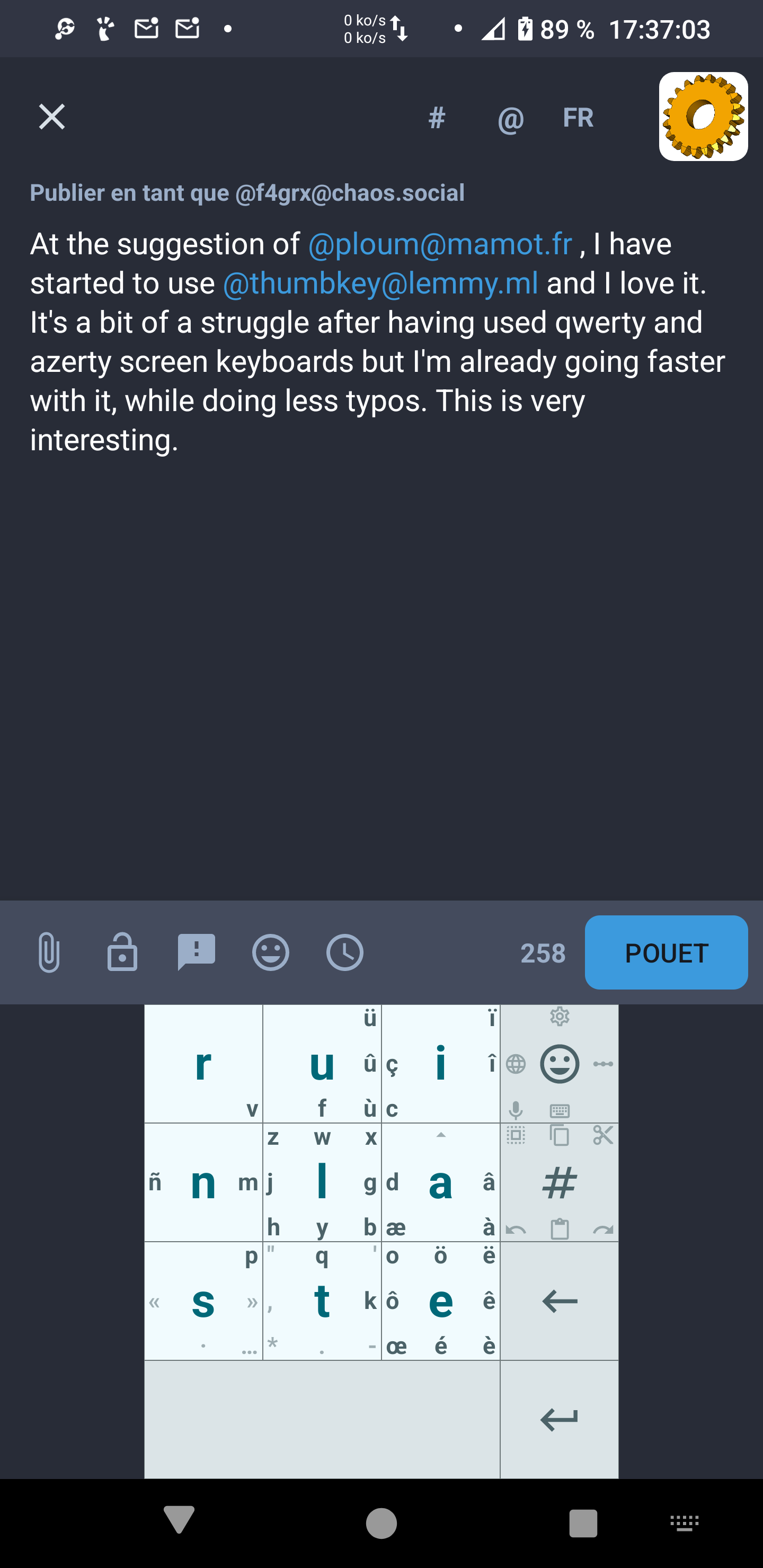
Thumb-Key is a privacy-conscious smart keyboard, made specifically for your thumbs.

It features a 3x3 grid layout, as many older phones had, and uses swipes for the less common letters. Initial testing shows that you can reach ~25 words per minute after a day of use.

Instead of relying on profit-driven, privacy-offending word and sentence prediction for accuracy, as do most popular phone keyboards like Gboard and Swiftkey, Thumb-Key uses large keys with predictable positions, to prevent your eyes from hunting and pecking for letters.

As the key positions get ingrained into your muscle memory, eventually you'll be able to appromixate the fast speeds of touch-typing, your eyes never having to leave the text edit area.

This project is a follow-up to the now unmaintained (and closed-source) MessageEase Keyboard, which is its main inspiration.

founded 2 years ago
MODERATORS
1


On desktop, I use the AI-designed Halmak Keyboard, and its had great results.

Rather than manually picking letter positions, Halmak was designed by an evolutionary algorithm, based on a given set of criteria, and sample text.

I designed the original english thumb-key layout manually, with trial-and-error, and based essentially on 3 criteria:

  • Letter frequency
  • Alternating thumbs
  • Thumbs come from the bottom corners, so lower and edge tiles are easier than higher.

But I did not take into account things like digrams / trigrams, and I don't know enough about evolutionary algorithms to do it.

Would anyone be interested in tackling this problem?

2


How would I go about adding Chinese? It seems a much larger task than just changing the layout, etc.

3
4


I'm thinking of implementing a new feature for Thumb-Key: richer haptic feedback that will make it easier for users to blind-type.

While reviewing the current places where Thumb-Key already performs haptic feedback, I noticed something strange.

When doing a long-press gesture, there are two moments of haptic feedback. First is when the finger initially touches the keyboard key, and second when enough time has passed for the press gestured to be registered as a long press. The second haptic feedback is noticeably stronger than the first.

However, as far as I can tell, both events call the exact same function with the same parameter for both events:

view.performHapticFeedback(HapticFeedbackConstants.KEYBOARD_TAP)

So how come the second feedback is stronger than the first?


Here is the code for initial press.

And here is the code for the long press.

5
6
2
submitted 3 weeks ago* (last edited 3 weeks ago) by dessalines@lemmy.ml to c/thumbkey@lemmy.ml
7


supposedly the programmer layouts have ctrl and alt like old messagease had but i can't find them? all i can find is dessalines saying it should be in the thumbkey developer layouts in here: https://github.com/dessalines/thumb-key/issues/656

8


I have tried Thumb-Key before where I didn't really try to learn much, but since I recently decided to change my desktop layout to a variation of the Gallium layout called Lucens, I decided to also give Thumb-Key another try on my phone and it has been a pretty cool learning experience, I can definitely see the potential here once I get fast enough.

That being said I'm having trouble with some gestures that I can't get consistency with. Specifically Drag-and-return and Circular Drag.

With Drag-and-return, it only works on the letters that need swipe for me to capitalize them. And with Circular drag, I can't consistently make it work, doing the same gesture, it sometimes capitalize, sometimes not, sometimes input the number, sometimes not.

Is there some tips for getting this right?

9


Hi, would there be an easy fix for some modifications not working when I type inside the Secure Folder (on a Moto G)? I noticed that the issue is related to specific positions. There are 3 spots where I put "@", "!" and "(". At first, I thought the problem was related to the symbols, but even when I replace them with letters, those spots still don't work. I have the same modifications inside the secure folder and outside it (a copy-paste) and it works as expected when I'm outside of the Secure Folder. I can paste my whole code if it helps. Thanks for finally implementing this user-friendly feature!

10


Is there a way to modify a key to toggle the case? It doesn't seem to be an option in keyActions.

11
12
13


Hi everyone, I'm new to using Thumb-Key and the likes (though I used regular 9-key keyboards back in the day), and I'm really liking. I already got the hang of customizing YAML and changed a few things on my Portuguese Split layout, though there are a few things I'm not 100% getting right and, if y'all could, I'd love some pointers. Attached, is my current layout and YAML file.

What I'd like to do: 1- Switch the space key with the backspace key (respectively, currently they are key0_1 and key2_2). 2- Remove the swipe-for-cursor from "?" key (key1_2), which is a space key that I've changed the text.

Can that be done? If so, what settings should I input in my YAML file?

Minor things, not necessary but cool if it could be done: -Can I alter the background color for "?" key (key1_2) so it's black like the other keys? -Can I alter the alpha for the swipe keys in the "?" key (key1_2) so they're not white like the main key, and instead be dulled like the copy, cut, paste keys from emoji key (key1_0)? -Is it possible to bind double quotes (") to a key? If I try { text: """ } the YAML returns an error message. Single quotes work, though.

My YAML file:

spoiler

PTTypeSplit:
  main:
    key1_2:
      swipeType: EIGHT_WAY
      center: { text: "?", size: LARGE }
      left: { text: "!", size: SMALL }
      top: { text: ";", size: SMALL }
      bottom: { text: ":", size: SMALL }
      right: { text: "-", size: SMALL }
      topRight: { remove: true }
      topLeft: { remove: true }
      bottomLeft: { remove: true }
      bottomRight: { text: "_", size: SMALL }
    key2_2:
      center: 
    key3_1:
      center:
  shifted:
    key1_2:
      swipeType: EIGHT_WAY
      center: { text: "?", size: LARGE }
      left: { text: "!", size: SMALL }
      top: { text: ";", size: SMALL }
      bottom: { text: ":", size: SMALL }
      right: { text: "-", size: SMALL }
      topRight: { remove: true }
      topLeft: { remove: true }
      bottomLeft: { remove: true }
      bottomRight: { text: "_", size: SMALL }
    key2_2:
      center: 
    key3_1:
      center:
  ctrled:
    key3_1:
      center:
        keyAction:
    key0_3:
      center:
        keyAction:

14


I'm using Android Studio on Windows 11, and trying to debug ThumbKey on an emulated device.

For some reason, the ThumbKey keyboard doesn't appear.

Looking at the logs in Logcat, there is one suspicious line:

2025-07-24 19:50:30.200  4769-4769  ImeBackDispatcher       com.dessalines.thumbkey.debug        E  Ime callback not found. Ignoring unregisterReceivedCallback. callbackId: 88733492

I'm new to Android dev, so I'm not sure how to debug this.

I tried fiddling with the keyboard settings of the emulated device, and some other proposed solutions I found on StackOverflow, but nothing I tried worked so far.

I am testing this on version 5.0.3 (commit acad975f51d7b399a567b2d1217a3209b6bbef96)

15
16


I'm new to Android dev, and I recently added my first contribution to ThumbKey (the Key Modifications feature).

I noticed that ThumbKey saves user settings using a Room database rather than using DataStore, or its outdated equivalent SharedPreferences.

Why is that? What's the advantage?

17


Thanks to @toldry for adding this.

18
1
(mamot.fr)
submitted 9 months ago by nadaillat@mamot.fr to c/thumbkey@lemmy.ml


@thumbkey
Anyone know how to make a "quick" number zero [ 0 ] with a gesture like a swipe, a drag & return, or clockwise/anticlockwise drag ?
I find that this is complicated by the fact that on most layout that I use, the "hidden" number zero is "behind" the space bar.
Actually, I'm using the "français messagease" layout.
Thanks !
(๑ᵔᴗᵔ)ノ゙

19
16
submitted 9 months ago* (last edited 9 months ago) by vagrant@leminal.space to c/thumbkey@lemmy.ml


sorry for posting here, but i don't want to register on github for fear of its privacy policy.

other languages do have it on middle-down>left, but not english for some reason. i know about ghost keys and symbols layouts, but they cause a lot of mistyping for me

20


I use a lot the clockwise drag to quikly access the numbers when I'm typing. It saves me a lot of time. (The counter-clockwise for opposite-case letter is great too.) But I can't seem to find a way to do this for the number 0 (zero) with my actual template. I'have been using "français thumbkey-v3" for some months now, and would very much like to keep using this template.

[(https://docs.tila.im/f/c58ca5e922a84c79af88/)]

21
22


Would it be possible, that someone can either

  • adapt the German messagease layouts and create "messagease left-handed" and "symbols messagease left-handed", or

  • direct me to instructions on how to change/create layouts myself?

Help would be much appreciated.

23
24
25
view more: next ›