Can’t make the wrong people look bad.
An unofficial chapter of the popular Dull Men's Club.
1. Relevant commentary on your own dull life. Posts should be about your own dull, lived experience. This is our most important rule. Direct questions, random thoughts, comment baiting, advice seeking, many uses of "discuss" rarely comply with this rule.
2. Original, Fresh, Meaningful Content.
3. Avoid repetitive topics.
4. This is not a search engine
Use a search engine, a tradesperson, Reddit, friends, a specialist Facebook group, apps, Wikipedia, an AI chat, a reverse image search etc. to answer simple questions or identify objects. Also see rule 1, “comment baiting”.
There are a number of content specific communities with subject matter experts who can help you.
Some other communities to consider before posting:
5. Keep it dull. If it puts us to sleep, it’s on the right track. Examples of likely not dull: jokes, gross stuff (including toes), politics, religion, royalty, illness or injury, killing things for fun, or promotional content. Feel free to post these elsewhere.
6. No hate speech, sexism, or bullying No sexism, hate speech, degrading or excessively foul language, or other harmful language. No othering or dehumanizing of anyone or negativity towards any gender identity.
7. Proofread before posting. Use good grammar and punctuation. Avoid useless phrases. Some examples: - starting a post with "So" - starting a post with pointless phrases, like "I hope this is allowed" or “this is my first post” Only share good quality, cropped images. Do not share screenshots of images; share the original image.
.
Can’t make the wrong people look bad.
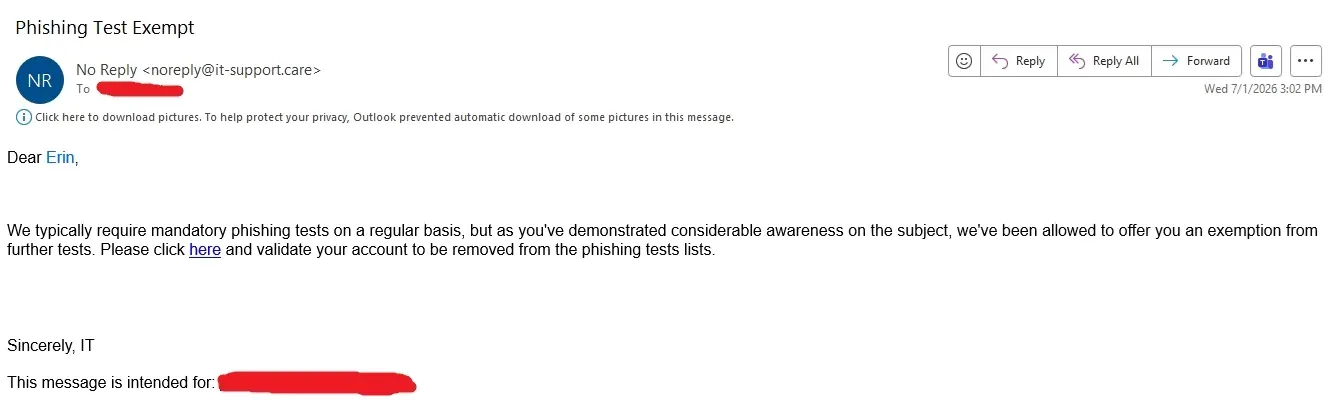
Tell your relatives that this IS the phishing test email. If you click that link, you're gonna get busted by your IT department.
Never click links (or for that matter, ads) in emails. Always verify the sender first. Not the display name, the actual email address that it was sent from.
If you must go to a link, best to find out what website they're sending you to (hover over the link for the URL), then type in the main website manually from a web browser.
For example, if you get an email from US Bank (assuming you use them), type "usbank.com" (minus quotation marks) in your browser, then login to your personal bank account on their official website. Don't trust a link to a bank's website without typing it yourself. Don't just copy/paste the full URL from your email either.
Some links, even to legitimate websites, can have tracking data in the URL that gives a lot of info about you, where in the world you're browsing from, what web browser you're using, what website, app, or program you clicked the link from, etc. Basically, remove the ? and everything after it in URLs before loading them in your browser.
These are just a few basics to protect yourself from malicious links. Basically, don't click any link you don't recognize and verify with people who send you links. And even then, protect yourself from idiots who forward links without doing their own spot checks. Even your best friends can send you viruses and malware. Heck, that's how a lot of it spreads across the Internet.
And especially don't trust your own IT department when they ask you to click links in their emails.
Sincerely,
~A former IT guy