this post was submitted on 18 Jun 2026
0 points (50.0% liked)

techsupport

3168 readers
1 users here now

The Lemmy community will help you with your tech problems and questions about anything here. Do not be shy, we will try to help you.

If something works or if you find a solution to your problem let us know it will be greatly apreciated.

Rules: instance rules + stay on topic

Partnered communities:

You Should Know

Reddit

Software gore

Recommendations

founded 3 years ago
MODERATORS
 
top 16 comments
sorted by: hot top controversial new old
[–] deadbeef79000@lemmy.nz 4 points 3 weeks ago (1 children)

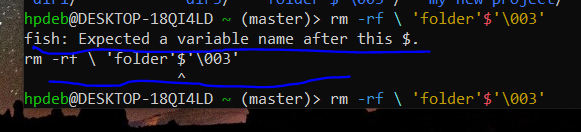
It's just not escaped properly.

You can probably just get away with putting a backslash \ before the $ so it looks like \$.

[–] OrangePumkin@piefed.nl 0 points 3 weeks ago (1 children)
[–] deadbeef79000@lemmy.nz 2 points 3 weeks ago

I'm unfamiliar with fish but that $'\003' also looks a lot like how bash escapes unprintable control characters (ASCII 3 is 'end of text' apparently).

You probably have sh or bash available. Try the same command in that.

sh -c "rm -rf 'folder'$'\003'"

Or just delete all directories that start with folder with confirmation (no -f):

rm -r folder*
[–] fartsparkles@lemmy.world 2 points 3 weeks ago (1 children)

The quotes and escapes are mangled.

cd into the directory with the folder to remove, type rm -rf ./ then press tab until the folder you’re looking for is autocompleted after the ./

[–] OrangePumkin@piefed.nl -1 points 3 weeks ago (1 children)
[–] fartsparkles@lemmy.world 2 points 3 weeks ago (1 children)

If you’re struggling, might as well either open a file manager like midnight commander to make your life easier.

[–] OrangePumkin@piefed.nl -2 points 3 weeks ago (2 children)
[–] Janx@piefed.social 4 points 3 weeks ago

a file manager

[–] statelesz@slrpnk.net 2 points 3 weeks ago

Just type rm -rf f and use tab to auto complete.

[–] one_old_coder@piefed.social 2 points 3 weeks ago
[–] Lojcs@piefed.social 1 points 3 weeks ago* (last edited 3 weeks ago)

Are you sure the name is 'folder'$'\003'? I think the outer quotes might be added by ls. I would try rm -rf 'folder\'\$\'\\003'

Edit: Or rm -rf 'folder\'$\'\\003'

[–] altphoto@lemmy.today 0 points 3 weeks ago (1 children)

You probably don't own the folder. Use sudo.

[–] OrangePumkin@piefed.nl -1 points 3 weeks ago (1 children)
[–] OrangePumkin@piefed.nl 0 points 3 weeks ago (1 children)
[–] altphoto@lemmy.today 2 points 3 weeks ago

Oh. Sudo is the special word meaning admin. So if you have a command like rm and it fails due to permissions you simply add sudo. sudo rm. But I see that your problem is the folder name. So nevermind. Maybe look at the spaces? Maybe you have tab$tab instead of space$space?