I have posted the problem in the forum too:
https://forum.freecad.org/viewtopic.php?t=97860
There is no problem in sketches and the main problem is in Part workbench. When I create a body, then click on fillet this happens.
I have posted the problem in the forum too:
https://forum.freecad.org/viewtopic.php?t=97860
There is no problem in sketches and the main problem is in Part workbench. When I create a body, then click on fillet this happens.
What exactly CAPTCHAs do? Stop humans?
Will it effect free custom ROMs like lineage?
After updating freedesktop.Platform with flathub the problem has been solved.
I have archlinux with GNOME 48 and wayland. When I run apps which I have installed them from flatpak I get error below:
MESA-INTEL: warning: Haswell Vulkan support is incomplete
MESA-INTEL: warning: ../src/intel/vulkan_hasvk/anv_formats.c:759: FINISHME: support YUV colorspace with DRM format modifiers
MESA-INTEL: warning: ../src/intel/vulkan_hasvk/anv_formats.c:790: FINISHME: support more multi-planar formats with DRM modifiers
The apps are shown like the screenshot:

They work, but nothing is shown!
I did not have the problem since I updated the packages with pacman and vulkan-icd-loader and vulkan-headers updated from 1.4.309 to 1.4.313.
Yes, the problem has been solved! But the phone says Format the SD card to use it! I have much data on the SD card.
Encryption is disabled in the settings.
Thanks! I wasted your time. As you said the problem caused a headache to me. I stop trying on it for some days.
Thank you for spending your time. Yes, resolvectl status's output is like yours in Global part, but in the end of the output there is this:
Link 3 (wlp3s0)
    Current Scopes: DNS LLMNR/IPv4 LLMNR/IPv6 mDNS/IPv4 mDNS/IPv6
         Protocols: +DefaultRoute +LLMNR +mDNS -DNSOverTLS DNSSEC=no/unsupported
Current DNS Server: 192.168.1.1
       DNS Servers: 192.168.1.1
     Default Route: yes
As you see, wlp3s0 uses the default ISP DNS. Wireshark's output confirms this.
I ran the command with sudo and got the error. I created the file with sudoedit and added the contents in it and systemctl reload systemd-resolved. But the DNS requests are sent with port 53 to the default DNS server yet and:
cat /etc/resolv.conf
# This is /run/systemd/resolve/resolv.conf managed by man:systemd-resolved(8).
# Do not edit.
#
# This file might be symlinked as /etc/resolv.conf. If you're looking at
# /etc/resolv.conf and seeing this text, you have followed the symlink.
#
# This is a dynamic resolv.conf file for connecting local clients directly to
# all known uplink DNS servers. This file lists all configured search domains.
#
# Third party programs should typically not access this file directly, but only
# through the symlink at /etc/resolv.conf. To manage man:resolv.conf(5) in a
# different way, replace this symlink by a static file or a different symlink.
#
# See man:systemd-resolved.service(8) for details about the supported modes of
# operation for /etc/resolv.conf.

nameserver 127.0.0.1
nameserver 192.168.1.1
search .
install -o0 -g0 -m644 <(cat <<EOF [Resolve] DNS=127.0.0.1:9053 EOF ) /etc/systemd/resolved.conf.d/90-dns_port.conf
The output is an error:
install: cannot stat '/dev/fd/63': No such file or directory.
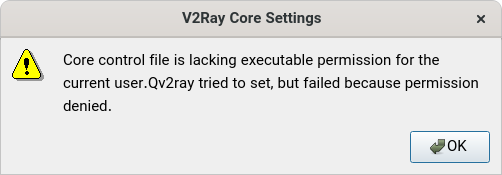
In qv2ray when I set the core path in the settings and click on Check v2ray core settings, I get this message:
Core control file is lacking executable permission for the current user.Qv2ray tried to set, but failed because permission denied.
I have installed qv2ray from flatpak. The permissions of the core file is:
-rwxrwxrwx
What is the problem?
I use coc-pyright as python code completer in debian. When I work on a django file, I get errors like this error in neovim env. But django runs codes without any problem. I have installed django with apt and not with pip and also I am not in a venv.

Yes, it happens every time, but the stranger thing is that I have changed my laptop in the past year, but the problem exists in my new laptop too! I think it is Qt's problem on GNOME.