Pop!_OS (Linux)
5972 readers
1 users here now

Pop!_OS is an operating system developed by System76 for STEM and creative professionals who use their computer as a tool to discover and create. Unleash your potential on secure, reliable open source software. Based on your exceptional curiosity, we sense you have a lot of it.

Whether this is your first experience with Linux, or your latest adventure, all are welcome to discuss and ask questions about Pop!_OS and COSMIC. Keep the discussions friendly though, and remember to assume good intentions whenever you reply. We're all here because we have a shared love for Linux and open source software.

Support us by buying System76 hardware for you or your company! Or by donating on the Pop!_OS website through the "Support Pop" button. Pop!_OS and COSMIC are fully funded by System76 hardware sales. All systems are assembled in the USA. With your support, we'll work to push the Linux desktop forward with COSMIC.
Links
Guides
Hardware
Recommended
- !system76@lemmy.world
- !linux@lemmy.ml
- !opensource@lemmy.ml
- !linux@programming.dev
- !linux_gaming@lemmy.world
- !linux_gaming@lemmy.ml
- !selfhosted@lemmy.world
- !rust@programming.dev
- programming.dev
- fosstodon.org (Mastodon)
- !redox@lemmy.world
Community Rules
Follow the Code of Conduct
All posts on pop_os must adhere to the Pop!_OS community Code of Conduct. https://github.com/pop-os/code-of-conduct
Be helpful
Posts to pop_os must be helpful. When responding to a user asking for help, do not provide tongue-in-cheek responses like "RTM" or links to LMGTFY. Linking to direct sources that answer the asker's question is fine, but it's advised to provide some explanation as to how you got to that source.
Critique should be constructive
We within the Pop!_OS community welcome helpful criticism or ideas on ways to improve. However, basic "It's bad" or other simple negative comments don't help anyone fix anything. When voicing a complaint about something, try to point out ways the complaint could be improved or worked around, so that we can make a better product for it.
This rule applies to both Pop!_OS and its projects as well as other products available from third-parties.
Don't post malicious "advice"
It can be funny to joke about malicious commands, however this is not the venue for it. Do not advise users to run commands which will lock up their systems, steal their data, or erase their drive. Examples of this include (but are not limited to) fork bombs, rm, etc.
Posts violating this rule will be removed, even if the post is clearly in jest. Repeated offences may lead to a ban. You may understand that the command isn't serious, but a new user might not.
No personal attacks
Posts making a personal attack on any user will not be tolerated.
No hate speech
Hate speech of any kind will not be tolerated. Any violations will be removed, and are grounds for a ban.
founded 3 years ago
MODERATORS
1
2
3
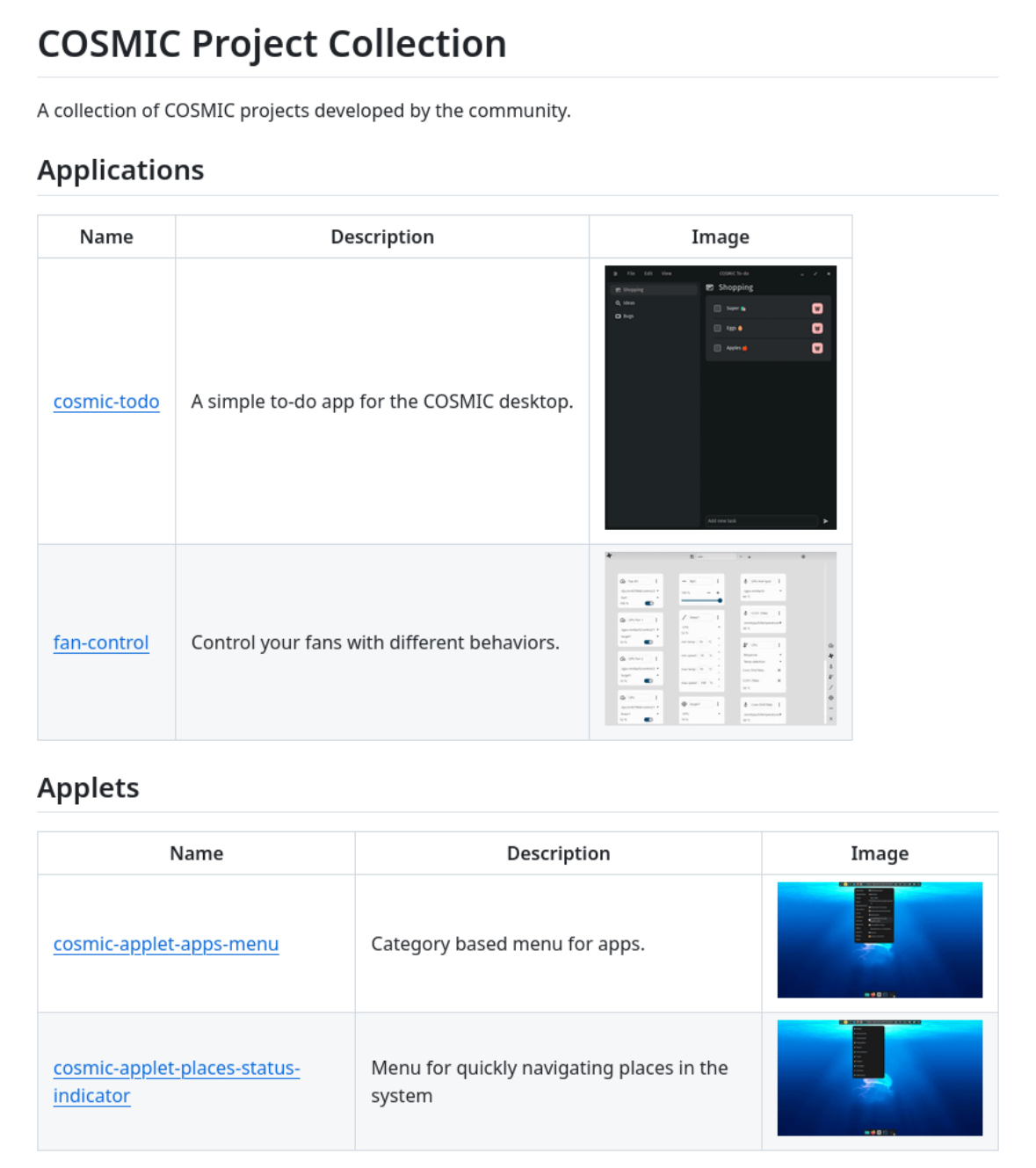
I created a GitHub repository to showcase COSMIC projects.
I included the projects I could find but if you have an project and want to include it, please open a pull request with your project added to the applications.ron or applets.ron file.
4
5
6
1

7
8
1

9
EDIT 2: Solved. I was sending uppercase characters when I would do the connection from MS RDP. My Pop OS login username has uppercase characters so I was just matching that. I got confused because the username defined in the Pop remote desktop settings is the same username, but spelled all lowercase. Once I altered the username I was sending from MS RDP to match exactly including casing, it worked.
As a side note, the default MS RDP app doesn't handle the resolution properly. I switched to using RDCMan from the Sysinternals Suite and it handles the resolution perfectly and you can set scaling on it so you don't have to worry about that. I'd recommend RDCMan if anyone else is running into the same issue.
EDIT: Error code image attached and extended details pasted here.
[Window Title]
Remote Desktop Connection

[Content]
An authentication error has occurred.
The token supplied to the function is invalid

Remote computer: [Redacted]

[^] Hide details  [OK]

[Expanded Information]
Error code: 0x0
Extended error code: 0x0
Timestamp (UTC): 08/05/25 01:32:11 PM
Activity ID: 2473cbfb-5b74-4229-8644-1cf6b0bb0100
Hey Everyone,
I was wondering if anyone can help troubleshoot an issue I'm having trying to RDP from my Windows 11 box to my Pop!_OS box.
I have Remote Desktop enabled in Pop and I've set the username and password.
When I try to connect from Windows using Microsoft's RDP application, I get an invalid token error.
Is anyone able to tell me what I'm missing in the setup?
Thanks

10
11
12
13
14
15
17
18
19
20
21
22
23
25
All I want is to take my F5 key and assign it to the media key for volume down. BIOS will not do this. Gnome lets me do it.
When I try to hit F5 the key does nothing in the input field.

view more: next ›