lost_faith

joined 2 years ago
[–] lost_faith@lemmy.ca 1 points 2 days ago

Or, he is looking at his family and not many make it past that age? Only a few men in my family made it to 70, the women mostly made it to between 80 and 92

[–] lost_faith@lemmy.ca 1 points 2 days ago

I just get curious when I see an app I didn't know about that is similar to one I use. Other than access from the boot menu it sounds just like ts. I may check it out on one of my test laptops to see how different it is

thanks

[–] lost_faith@lemmy.ca 2 points 2 days ago (2 children)

How does snapper compare to timeshift? Ease of use. Been using ts since I got back into linux and have used it quite a few times already

[–] lost_faith@lemmy.ca 10 points 3 days ago

try to focus that hate on our elites

"The Epstein Class"

[–] lost_faith@lemmy.ca 2 points 3 days ago

I knew a girl that ironed her hair in hs, well her mom did it

[–] lost_faith@lemmy.ca 1 points 3 days ago

Kubuntu is what I use to game/VR/stream, it also asks during install if you want non-free repo which will install your nvidia drivers then you can choose which version you use in the settings menu, I used official for VR as that was the recommendation.

My current rig is all AMD (for compatibility) my previous rig was ryzen and rtx 2070 super upgraded to 4070 ti super, works great for streaming and gaming, the gf had an intel with 4 numbers, my rig before my previous rig, and it worked as well under linux as win 10.

As others have suggested, get the ISO's of several distros: Kubuntu/Ubuntu/Mint/Fedora/Cachy/etc and try them all before you blow your current setup away. My last system was my transition system, kept win 10 and installed a second drive for Kubuntu and used "bios" to chose when to boot it (duel boot on same drive will be problematic after a specific win update, you won't know which until you do lol) then found replacement software that I needed to move over 100%.

Good luck

[–] lost_faith@lemmy.ca 6 points 3 days ago

The alerts will only go to parents who are enrolled in Instagram’s parental supervision program.

Like this?

[–] lost_faith@lemmy.ca 1 points 3 days ago

There was a time when you joined a military you took a completely different first and last name exactly for this purpose. This needs to be revisited

[–] lost_faith@lemmy.ca 3 points 3 days ago

Been saying for a very long time (is 8 months a long time? feels like it) that Cusma is DoA, will not be resigned. I hope Carney does as you say Leave the Table. As Carney said, it is time for middle powers to get together and leave the states as an outsider. Use China as a bargaining chip (to use up our resources we would have sold to the states) until we solidify better stable partners elsewhere.

[–] lost_faith@lemmy.ca 4 points 3 days ago

How many bugs can I put in this ice treat before Leonard notices

[–] lost_faith@lemmy.ca 1 points 3 days ago

Funny, my boomer parents are sad with the state of affairs I have had to navigate compared to themselves through life. Cost of buying a house, car, daily needs

[–] lost_faith@lemmy.ca 3 points 4 days ago

Only one thing he's ever been in touch with...


I have a friend coming for a visit in a few months, early spring, who is legally blind, I believe less than 2% vision in one eye and none in the other. I want to hand him a laptop with kubuntu on it to use while here for web browsing (Firefox) and streaming (OBS/Stream yard). He does not read braille.

Are there any users with this disability here, or anyone have experience setting up KDE for visually impaired people, what apps do you use?

I've briefly looked at Orca but it says it is a Gnome app (will need to look deeper/test it), Emacspeak looks like something I will try to setup for him, seems to not be a dumb reader. I want him to have such a good experience he would be willing to change his own pc over (prolly won't happen but I'd still like his experience to be as easy as possible for him)


Running Kubuntu atm but looking to see if I can get more out of my hardware. I booted up Cachy last night from ISO and it took barely any of my ram, 3gb I think, for the test I was going to install Steam and link to my existing game library mounting my kubuntu drive. My VR experience is quite acceptable at the moment, but it could be better. I get occasional stutters and sometimes I am put into the steamVR environment for a second if I turn too fast, I am hoping a more up to date kernel could help. Using the steam system monitor shows that when this happens my CPU/GPU/RAM are never close to being at 100% often at or less than 75% usage each, though the FPS is often around 40 - 60 (og vive headset, on windows rarely went above 50fps often down to 30). Hardware is Ryzen9 9950X and Radeon RX 9070XT OC. So the questions are:

  1. Will everything just "work" as stated? Install steam, link to steam library for games (I expect these to just work, downloading for a one off test will take a long time on a problem game of 15+gb) and steamvr (this is my kinda concern, though it should be small enough to install in ram if necessary)?
  2. I have 64gb ram, will this run similarly to being properly installed on an m.2 drive?
  3. Is there anything I should look out for when doing this?

Any tips, suggestions, or links would be appreciated. I am not at my pc but should be able to answer most questions.

Asking here as this IS gaming related, but if another place would be better I will move the post there.


Ok, so I have Kubuntu installed running wayland and setup steamvr. The first few times it gave me the screen sharing portal, but through NOT reading carefully I accidentally setup all screens as the same one instead of the 2 different displays and 1 mirror display. OBS has this wonderful little button to trigger this to open to change which screen is shared, does anyone know how to do this for steamvr? (if you need info plz supply the command to retrieve it) I will say that wayland is working great for me so far except for my error, out of the 6 vr games I have tested (they ran badly on my previous system) only Into the Radius 2 has a slight flashing/flickering issue the other games that were almost or completely unplayable under my last system (RTX 4070ti super) are smooth as butter now.

I have temporarily gone back to X11 due to not being able to access my desktop through WLX-Overlay-s. Any help would be appreciated.


I had a thought about this AI crap in everything (don't get me wrong current AI does have its positive uses) referring to this post and a few others. What if "they" are shoving AI into these devices not just for surveillance (the Intelligence part of current AI) but to also make use of our "unused computer cycles" see BOINC, I used to donate my unused cycles to this Berkeley initiative over a decade ago. What if due to the expense of the centres, lack of enough centres, and the lack of hardware for said centres they are using our devices as a distributed network?


So, I changed my daily driver to linux several months ago and my gf a few weeks ago. I noticed 2 strange but good things after the change. For my system I have a onboard sound card (stereo) and am using 3 of the 5 speakers for my decade or so old Creative labs 5.1 speakers. Under win 10 most of my sound came from the left and centre speakers with base cannon doing its thing, under linux using the generic drivers included during install all 3 desktop speakers put out the appropriate sound. YAY!

My gf is using my old hand me down prebuilt. Under win 10 the fans on that thing would be kicking on and off constantly, I could hear the fans over the running water doing dishes. Now? 99% of the time is straight silence unless she is playing ESO.

Only issue left on her machine is having it be able to play ESO and be able to watch a yt vid at the same time. Right now it is ESO and nothing else, when she tries the whole system lags until she can move the mouse painfully slowly to the browsers X. forget which intel cpu is in there(it's about 8-10 yrs old iirc), GTX 1060 ~~6~~ 3gb, and 16gb ram, Kubuntu 24.04, KDE. Are we asking too much of the system, did I misconfigure something? She was able to do this on windows


I've been hearing some good things about WinBoat, so I am wondering if anyone has tried to use it with game mod loaders. Like the windows version of Satisfactory Mod Manager (I know there is a linux one that works perfectly and exactly like the windows version but as this is a very popular game maybe someone did it this route) or, the one I am really interested in right now, Raft Mod Loader. Raft Mod Loader page suggests 1. Bottles and less recommended 2. straight wine. I would like to use a single solution for most of my windows carry overs, ie; steam is one stop for ~90% of my games flat and VR, lutris is one stop for 2 non steam games atm, but I am uncovering more as I go.

I also have 2 windows only apps for VR - FPSVR and Desktop+(this is free), obviously they will not want to port their apps to linux for such a small user base. Has anyone tried these in WinBoat?

EDIT: So, yeah. For my needs this is a 20lb sledge hammer putting in a finishing nail

69
submitted 5 months ago* (last edited 5 months ago) by lost_faith@lemmy.ca to c/linux@lemmy.ml
 

Tonight I am installing Kubuntu on the gfs machine. Once she is comfortable with that, and the support ends for our version prolly going with Debian. Going to remove her windows drive (256 or 512GB) as there is only 1 m.2 port on the board, and replace it with a 1tb.

Her needs are simple, make Logitec G13 work (works and tested on my machine for months), Make ESO and addons work (Lutris has its own installer for ESO YAY! Minion has a linux version.), and minecraft java (found in app manager).

Now, she has some knock off razor mouse with buttons under the thumb, maybe the razorx software or whatever it's called will work on her mouse?, this may be a slight pain point. I am hoping this will work out and she will be happy with her (new) pc, we are preserving her windows as a fall back if she hates it. I have a short video lined up to teach her the linux file system. She won't be doing anything command line, for now, except to start the G13. Gonna leave her with the dolphin file manager as it is difficult to get elevated privileges compared to nautalis(sp?) where it is a simple checkbox click. Anything else to suggest here?

I can mostly teach her what she needs to know as we go, she is a smart cookie and has picked up everything I taught her for windows and networking so far so should not be an issue for her, but if you guys have any suggestions on tutorial vids for non power users or other things I can do to make this even more seamless it would be appreciated.

Edit: Thank you all for your input, very much appreciated. I will keep monitoring for new posts


(I hope this is an appropriate place for this, if not plz remove and maybe let me know where is appropriate, thanks)

Absolutely love this guys take on life as a trucker in donalds US. In this video he is talking about the collapse, impending collapse?, of the supply chain. While he sits around at a truck stop after he should have had a delivery


I used to use linux decades ago, then stopped for multiple reasons. Now, with win 10 eol fast approaching, I have installed Kubuntu 24.04.2 mainly for VR gaming but other gaming and normal pc use as well. I have 2 devices I would like to replace for ones with full linux support(~~drivers~~ software), unless there are ~~drivers~~ software that are easy to install not requiring compilation from source. The devices are a Microsoft Intellipoint Trackball, basically a thumb driven trackball with at least as many buttons (more is better) as the image shows.
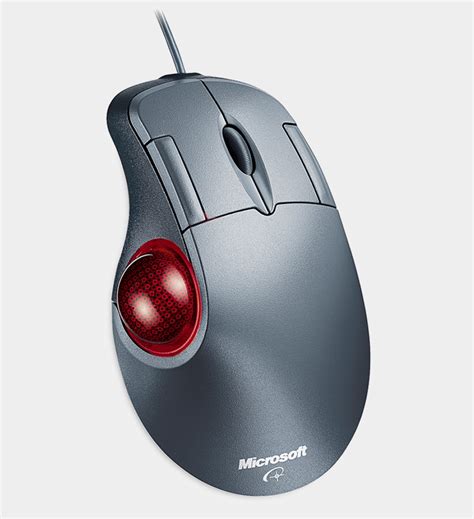
The second device is a Logitec G13

I use this for most of my flat games, and to control my video player. Suggestions for similar hardware or easy fully functional drivers would be appreciated. ie; the g13 has game profiles, stopwatch, clock, system monitor, and a few things I don't use, the trackball has all 7 buttons programmable to anything on the kb and then some.


Every time this comes up on my feed, generally from an ani.social account, my a/v says dangerous site and blocks the URL but that popup is getting annoying, how can I block this url from lemmy (default webpage/summit app). I have blocked the instance ani.social and 2 of their comms animemes@ani.social and ANI.SOCIAL META@ani.social. Now one of the 196 comms has the same url link from someone on ani.social. Can't turn off that notification as this is a work pc using shudder Nortons


A fun little site from our friends at Last Week Tonight. Type what you want then hit "SCREAM"


As I scroll through Lemmy, I keep seeing the same posts over and over. Exact same title (usually cross posted). Is there a way to group these posts so that we can decide which instance to interact with instead of seeing the same post 6+ times? It starts to feel like the content is just being recycled to the top of the next page.

I use the default browser on PC and Summit on my phone and usually sort by new. This same issue was starting to get to me on reddit til I left

view more: next ›