tuna

joined 2 years ago
[–] tuna@discuss.tchncs.de 5 points 2 months ago

Must love neovim so much ve uses ve/vim neopronouns

[–] tuna@discuss.tchncs.de 1 points 3 months ago

#5BCEFA at (21,7)

Palette and y-coordinate helper

  • Cyan - #5BCEFA at 7-10, 23-26
  • Pink - #F5A9B8 at 11-14, 19-22
  • White - #FFFFFF at 15-18
[–] tuna@discuss.tchncs.de 1 points 3 months ago

#FFFFFF at (21,15)

Palette and y-coordinate helper

  • Cyan - #5BCEFA at 7-10, 23-26
  • Pink - #F5A9B8 at 11-14, 19-22
  • White - #FFFFFF at 15-18
[–] tuna@discuss.tchncs.de 2 points 3 months ago

#F5A9B8 at (21,13)

Palette and y-coordinate helper

  • Cyan - #5BCEFA at 7-10, 23-26
  • Pink - #F5A9B8 at 11-14, 19-22
  • White - #FFFFFF at 15-18
[–] tuna@discuss.tchncs.de 2 points 3 months ago

#FFFFFF at (20,16)

I would have forgot yesterday too, I got out of the habit of checking Lol

Palette and y-coordinate helper

  • Cyan - #5BCEFA at 7-10, 23-26
  • Pink - #F5A9B8 at 11-14, 19-22
  • White - #FFFFFF at 15-18
[–] tuna@discuss.tchncs.de 2 points 3 months ago

#F5A9B8 at (20,14)

Palette and y-coordinate helper

  • Cyan - #5BCEFA at 7-10, 23-26
  • Pink - #F5A9B8 at 11-14, 19-22
  • White - #FFFFFF at 15-18
[–] tuna@discuss.tchncs.de 4 points 5 months ago* (last edited 5 months ago) (1 children)

Left monitor: theory

Right monitor: geometry dash

Play geometry dash -> take a break -> read theory -> take a break -> 🔁

I'm really liking this loop :3


One suggestion I have is an optional, guided prompt at the end of each resource/section, like "what are the 3 main points?" or "what is [thing] and why does the author argue against it?". I find it quite alarming when I read all the words but feel I missed the big ideas (regardless of whether it has my undivided attention). I think that those prompts would help retrain my mind to read the text actively and digest it better ^^

Edit: On second thought, "guided prompts" really just sounds like another name for homework, which im unsure if you really intend on having in your reading list... up to you :D

[–] tuna@discuss.tchncs.de 2 points 5 months ago

#5BCEFA at (22,8)

Palette and y-coordinate helper

  • Cyan - #5BCEFA at 7-10, 23-26
  • Pink - #F5A9B8 at 11-14, 19-22
  • White - #FFFFFF at 15-18
[–] tuna@discuss.tchncs.de 1 points 5 months ago

#5BCEFA at (20,8)

Palette and y-coordinate helper

  • Cyan - #5BCEFA at 7-10, 23-26
  • Pink - #F5A9B8 at 11-14, 19-22
  • White - #FFFFFF at 15-18
[–] tuna@discuss.tchncs.de 1 points 6 months ago

#FFFFFF at (19,15)

I think you missed mine from yesterday, #F5A9B8 at (19,11)

Palette and y-coordinate helper

  • Cyan - #5BCEFA at 7-10, 23-26
  • Pink - #F5A9B8 at 11-14, 19-22
  • White - #FFFFFF at 15-18
[–] tuna@discuss.tchncs.de 2 points 6 months ago

#F5A9B8 at (19,11)

Palette and y-coordinate helper

  • Cyan - #5BCEFA at 7-10, 23-26
  • Pink - #F5A9B8 at 11-14, 19-22
  • White - #FFFFFF at 15-18
[–] tuna@discuss.tchncs.de 2 points 6 months ago (1 children)

Cyan at that spot? D:


Video TranscriptTwo keyboard and mice collaboratively share a single output on the Weston compositor. This is shown as two independent pointers on the screen. They each open weston-terminal and can independently and concurrently move around and type in the windows.


The plan is to install Linux for my brother this week!

He is excited, but one thing I'm trying to figure out is how best to make multi-seat work.

His use-case is a bit special: he turns his 2nd monitor into a 2nd seat when he invites a friend over to play games.

There seem to be 4 main ways to get this to work

  1. Using systemd-logind
  2. Using virtual machines with usb passthrough
  3. Using Xorg
  4. Using a supported Wayland compositor

Solution 1 doesn't work because the PC has a single GPU. Plasma wayland also needs a workaround to recognize other logind seats.

Solution 2 is not ideal because the PC is not very high-spec. It's a bit tedious, but it is straightforward and well supported.

Solution 3 is not ideal because Xorg is dead. I wasn't able to test this because at some point my Xorg installation broke, but apparently Xorg does support multi-cursor with xinput. (Note that it does not necessarily work in Xwayland, because Xwayland exposes wayland seats, not udev devices.)

Solution 4 is where I lack knowledge. I know the core Wayland protocol supports multi-seat, and clearly Weston implemented this feature. Does Plasma Wayland support this in any way? Even if it was configuring a seat and giving it exclusive access to a client? Or maybe it's possible to run a lightweight compositor underneath which understands multi-seat, and run two nested compositors on top of it?

Sigh


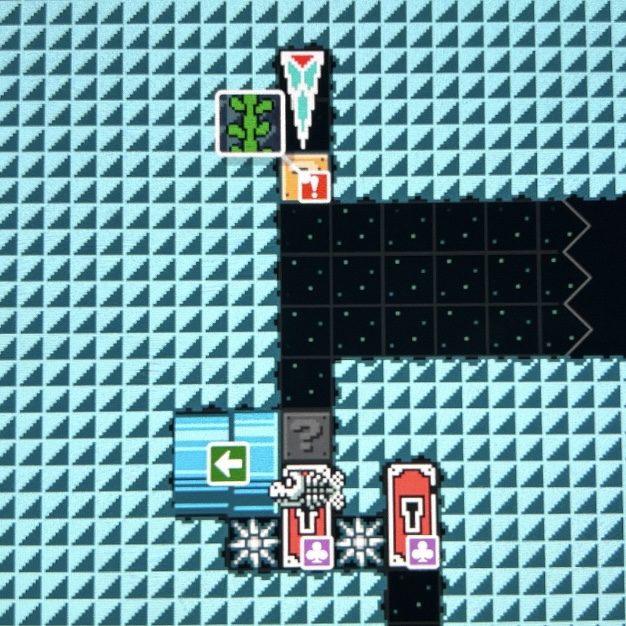
Mario is supposed to be small, and waits at the bottom until an icicle drops a vine from above. Spike traps make it so you cant climb the vine with diagonal joystick movement, and it shouldn't be possible to do a buffer jump since the vine won't come down for a while.

I'm not an expert in tech so if anyone manages to break it let me know!
 

Honestly I had no idea what ctrl+d even did, I just knew it was a convenient way for me to close all the REPL programs I use. The fact that it is similar to pressing enter really surprised me, so I wanted to share this knowledge with you :)


I think he runs Gentoo


One big difference between new players and experiences players is sightread distance. When you first play geometry dash, you focus a lot on your character, but over time your eyes drift to the right to see what is ahead.

The idea goes that you can simulate what it feels like to be a new player by decreasing your sightread distance. You could black-out certain parts of the screen, play test, then remove it afterward.

view more: next ›