The keybind explanations aren't particularly descriptive and it would be good if there were better descriptions for the reactions in particular, maybe even with a preview of each. Other than that, the event was great. Thanks.
this post was submitted on 20 Jul 2026
38 points (100.0% liked)
Canvas
2510 readers
1 users here now
Canvas — A collaborative annual pixel placing event for the Fediverse!
Links
- fediverse.events
- GitLab / Source
- Matrix Space
- Discord Server (bridged to matrix)
Atlas
https://2026.canvas-atlas.fediverse.events/
Timelapses
Organized by @grant@toast.ooo
founded 3 years ago
MODERATORS
The quality of life improvements for the canvas UI over the years made the experience for this year's canvas event incredible! I virtually had no complaints for the core features save for the buggy pixel cooldown timer, which was fixed later on. The best feature about this year was the addition of cursors, which really brought the canvas to life, plus it helped strangers coordinate with the pixel placements and also communicate with each other through gestures.
Here are my suggestions for improvements for the next year's canvas event:
- Make the template feature more intuitive: The current UI for adding templates through the URL was not obvious initially. Ideally the cotemplate feature should be integrated with the canvas UI instead of being in a separate webpage. If not possible, then at least add an option to display a short guide on using templates.
- ~~Allow non-team members to access other teams' templates: It was difficult assisting other users with their art since I didn't have access to their template (or I didn't know that I did). Even if I'm not in a team, I should at least have a read-only access to use other teams' templates on my own.~~
- Add coordination-centric reactions for cursors: The cursor reactions feature could be extended so you could communicate with other users directly with your cursor for coordination without actually having to text others. You could add emojis like thumbs up, thumbs down etc, tool icons like pencil, erase, fill etc, and even directional symbols like arrows pointing vertically, horizontally, diagonally etc.
- Add option to only place pixels on left mouse click: It was only later in the event that I realised that I was placing pixels even while right-clicking which I had reserved for moving through the canvas, wasting pixels in the process and possibly littering other users' art. It would be better to have control over how pixel placement has to be triggered.
I did find myself wishing for a thumbs up reaction or something like that it would be very handy indeed!
A preview of the emotes on the keybinds list would be good
and maybe increase the duration and size of the emoji reactions showing! I could barely tell what they show xD
Also a short guide for the template features
Definitely, I was going through them one by one trying to see what they were, hit the cooldown on them and never used them again.
Perhaps the cooldown could be reduced when coloring a blank pixel. I think this could accelerate initial efforts without affecting later interactions
I'm not sure I agree - this could lead to a massive land grab at the start, making it even harder to find space for new art for anyone coming later.
It also would make it easier to sabotage any art with white in, since you could colour it in quicker than people could fix.
I get what to mean: before we were able to color in the pride flag in the Lemmy logo, there was a growing void in that area. If the cooldown for blank pixels would have been lower, they could have made quicker progress. But the same goes for all the other pixelers, so they would have sooner been able to defend against the void.
So obviously this is gonna boost whoever is coming first, but it won't make it any easier to defend it. So the effect would be that the canvas would sooner fill up and there would be less blank.
I have the feeling that people are botting, especially the bronies. Anyone else has the same feeling, or are there just so many of them that they always immediately react if you paint over their stuff?
the bronies are by far the largest faction in the event and with pixel pulses you can catch someone griefing pretty quickly
I tried ranking my flower vine over their border with the Lemmy logo, and initially they resisted, but then I showed them what I wanted to do with the cursor and they let me. Didn't feel like botting.
I also had a good experience with the bronies being polite to my art once I messages them. I don't think they were botting, I just think they are numerous and well coordinated because they already have established groups.
Your vine was beautiful, my GF and I continued it a bit
I loved how you made your vine sync up with our sunflower patch (above the SLRPNK logo and Turtle Island flag) ^^
I didn't. I'm not convinced by antibot PoW though. It makes phones a bit laggy and I don't believe it benefits much given that there are machines orders of magnitudes better for this task. I could be wrong though. Most effective way to prevent bots is monitoring activity well and catching patterns manually imo
The template didn't seem to work very well, even when i made my own 1-to-1 pixel art version. To get that one to the right size, it blurred pixels together and was also still offset (though that might have been my zoom, I didn't realize until later). The picture and file were tiny, but when i put the URL, the picture was huge on the canvas so I had to scale it down which blurred the pixels together.
I loved the cursors, they were so much fun! I wish emojis were bigger and I wish there was a toggle to show the keybinds (and previews) at the bottom or something. It took me forever just to know they existed.
It works well on mobile, very good job, thank to the dev team :3
However i have connexion problem with ironfox, i had to switch to chrome 💀 maybe it was my own settings or something else.
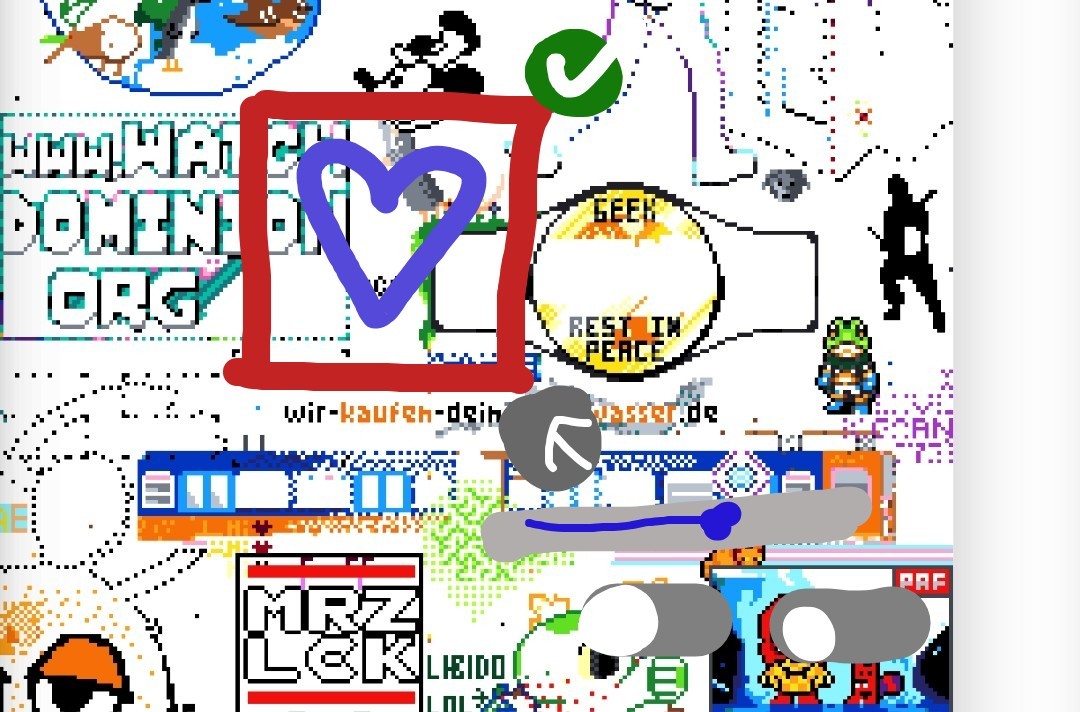
I have one idea to suggest you. The template layer could be a box where we can :
- move in the canvas with our finger or mouse
- reduce its size (width) by clicking on an arrow at the bottom right coner.
- fix its position by clicking on a check arrow
- manage its opacity by clicking on a button near template button. It should be located at the bottom bar.
It would be easier if we can manage it directly on the canvas instead of going into the sidebar :)
Here is a quick drawing of my suggestion :
During the event I saw some other cursors do some reactions/emojis, but couldn't figure out how they were doing it. Only just now did I realize the keybinds window in the settings was scrollable, where I found that the emojis were just the number keys.
I think for next year, it'd be helpful to have a How-to new user guide near the Share, Settings, Chat, and dark/light mode buttons. Something that pops up a window that basically gives a quick rundown of the essential things a new user should know to have a good experience, like letting them know that long-pressing lets you know who placed a pixel (only discovered that toward the end), how to do reactions, etc. Nothing too overwhelming or info-dense, just the essentials.
Not sure if I just missed it/am misremembering, but I feel like last year/s there was an option to upload your own template directly instead of just URL, was it always like this?
(In any case, thanks for the event as usual! And loved the new UI and color picker!)